MetaMask vs OKX Wallet vs Phantom
A longer supported-chain list is no reason to move from a wallet that already works for you. Start with the chain you need, the app you want to connect to, and whether you can understand the permission shown before signing.
Educational information, not investment advice. Security alerts cannot detect every attack, and a hardware wallet cannot decide whether an approval is sensible. See the disclaimer.
What this comparison can establish
The feature information below was checked against official documentation in September 2026. We do not have a reproducible set of transactions made on the same devices, versions and market conditions, so this comparison does not assign test scores, savings percentages or phishing-detection rankings.
I would start with a short list of the networks and apps I actually use. Receiving an asset, connecting to an app, swapping and signing with hardware are separate capabilities. A wallet may display a balance without offering the route you want. A supported hardware brand does not mean every device and network combination works.
Once those requirements are met, look at the details you will live with: can you distinguish accounts, read the permission request, and recover access if the device fails? A chain-count headline does not answer those questions.
OKX Wallet: the exchange balance still needs a withdrawal
OKX Wallet offers multi-chain asset management and swap entry points. Familiar navigation may help an existing exchange user, but switching to Web3 does not move funds into self-custody.
The official withdrawal instructions still require selecting the asset, destination wallet, network and account, entering an amount and confirming. Check the receiving address and network even when the app fills part of the form for you.
An aggregator is useful for viewing routes in one place. Whether a quote is cheaper depends on the final amount received after service fees, network fees and any approval transaction. Comparing quotes from different moments is not a controlled wallet test.
When connecting to an app, use a connection option that the app supports. If several extensions are installed, verify the wallet and account in the actual signing window; a “Connected” label alone is not enough.
MetaMask: the old EVM-only description no longer applies
MetaMask now provides native Solana accounts, as explained in its Solana guide. Its network instructions distinguish pre-enabled networks, networks available to add, and custom RPC configuration. You do not have to type an RPC manually for every L2.
For a custom network, verify the parameters against that network's official documentation. A convenient RPC offered by an unfamiliar website is not a trustworthy source by itself.
A gas estimate or maximum fee shown before signing is not the final fee charged. A higher “fast” estimate does not establish that users pay the same percentage more. Read the fee explanation and use the confirmed transaction receipt when comparing actual costs.
For hardware signing, check the exact device, connection method and target network. The software presents the request; the hardware signs it. You still need to inspect the device display and reject requests you cannot interpret.
Phantom: check Active Networks before sending
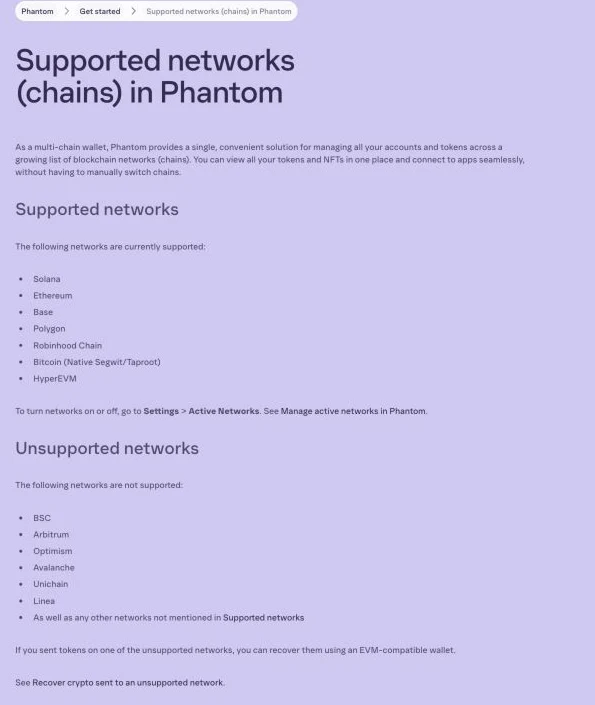
Phantom supports Solana and selected other networks. The official supported-network list includes Ethereum and Base and explicitly excludes Arbitrum, Optimism and BSC at this review. Its Settings → Active Networks screen shows which supported networks are enabled.
An identical-looking EVM address is not evidence that the destination network is supported. If you have already sent funds on an unsupported network, use the wallet's official recovery instructions for that situation. Never enter the recovery phrase into a website offering to rescue the funds.
For activity mainly on Solana, check whether the target app supports Phantom directly. If you occasionally need another chain, verify it separately. Keeping everything in one app is not worth sending assets onto an unsupported network.
A checklist for choosing a wallet
| Your task | What to verify | Common mistake |
|---|---|---|
| Use Solana | App support and SOL for fees | Assuming MetaMask still needs a third-party Snap |
| Use Arbitrum or BSC | The wallet's current network list | Phantom currently lists both as unsupported |
| Withdraw from an exchange | Asset, network, address, minimum and fee | Treating a Web3 toggle as a withdrawal |
| Use an internal swap | Route, net output, fees and spender | Assuming every supported chain has every route |
| Connect hardware | Model, version and network combination | Assuming brand support covers every combination |
How to compare a quote yourself
Use the same network, token contracts and input amount, and open the quotes close together. Before signing anything, record expected output, minimum output, service fees, network fees, spender and quote expiry. If a route is unavailable, mark it unavailable; do not invent a result.
Different pools and routing can produce different quotes, and both can change before execution. A single observation answers what was offered at that moment, not which wallet is always cheapest. A preview is not a completed trade.
If you decide to test with a small amount, first check minimums and native fee-token balance. The swap walkthrough explains what to inspect in the approval and swap requests. For long-term holdings, separating cold, hot and temporary wallets matters more than a feature score.
Three limits that feature lists leave out
Mobile and extension features can differ. A desktop tutorial may use a connection method or hardware integration that your phone does not offer. Check the instructions for your actual version.
An in-wallet app link is not a guarantee. The absence of an alert does not establish that a contract is safe. Pause at unfamiliar spenders, broad approvals or Permit requests you do not understand.
Recovery depends on the account type. Seed-phrase accounts, hardware accounts and alternative recovery schemes have different requirements. Social recovery and account abstraction add their own permissions and dependencies; they do not remove the possibility of loss.
FAQ
Is the OKX Wallet the same thing as my OKX exchange account?
No. The exchange is custodial; a self-custody wallet puts key management with its holder. Moving assets between them requires a withdrawal and a check of the asset, network and receiving address.
Is MetaMask obsolete in 2026?
The old EVM-only description is outdated. MetaMask now supports Solana and lets you add some networks without manual RPC entry. Suitability depends on your apps, networks and devices.
Phantom supports Ethereum now — can I just use one wallet?
Only if all your required networks and operations are supported. Its current official list excludes Arbitrum, Optimism and BSC. Check Active Networks before sending.
Is OKX Wallet's DEX aggregator actually cheaper than going to a DEX directly?
Not necessarily. Compare net output for the same tokens, network, amount and moment, including service fees, gas and approval costs. One quote does not prove persistent savings.
Are hardware wallets (Ledger, Trezor) replacements for these software wallets?
They can be used together, subject to device, software and network compatibility. Keeping keys on hardware does not make every signature safe; check the request on the device.