OKX Account and Web3 Wallet: Setup and Handover
An exchange account and a Web3 wallet may live in the same app but use different login, custody and recovery systems. If you choose OKX as an on-ramp, check regional and product eligibility first, then configure account security and wallet backups separately. Self-custody itself does not require an exchange account.
⚠ Educational content only — not financial, legal or tax advice. Verification times, fees and limits mentioned here were checked in 2026-09 and platforms change them without notice, so go by what the OKX page shows at the time. Crypto prices swing hard and on-chain transfers cannot be reversed. Full disclosure → disclaimer.
- What an account does on an exchange route
- Who is responsible for what
- Check your country first, then gather three things
- Signing up, and where the referral code goes
- Verification: what you upload and why it bounces
- Lock the account down on day one
- Connecting your wallet — a different code lives here
- The first transfer out
- What this account is not for
- FAQ · five questions that come up
What an account does when you choose an exchange route
Self-custody solves custody. It does not solve conversion. Those two get blurred together constantly, and that is where people stall.
A bank balance is not an on-chain token. An exchange or another available payment service can provide a conversion route; you may also receive assets as payment or already hold them elsewhere. This guide covers the exchange route without treating it as the only entry.
Platform custody exposes you to platform service and custody risks. Self-custody exposes you to key, signing and backup risks. Neither “keep everything on a platform” nor “use it for only minutes” is a universal storage rule.
Who is responsible for what
Rather than memorising definitions, sort it by what each side can actually do. This table is the reasoning behind everything that follows.
| Task | Exchange account | Self-custody wallet |
|---|---|---|
| Deposit via bank transfer or a local payment method | Depends on region and supported routes | The wallet does not handle bank balances itself; it may integrate third-party services |
| Convert back to fiat and send it to a bank account | Depends on region and supported routes | Requires an available off-ramp service |
| Swap one token for another | Yes, on the order book | Yes, on-chain, and you pay gas |
| Who holds the private keys | The platform | You |
| Account restricted or platform in trouble | Your balance is affected | No direct dependence on that exchange balance; issuer, app and chain risks remain |
| Forgotten password | There is a recovery process | Depends on remaining keys and backups; forgetting an app password alone does not remove on-chain control |
| Using on-chain apps, claiming airdrops, signing | The platform may offer related services under its own rules | The relevant wallet account signs or executes |
| Sent to the wrong place — recoverable? | Internal transfers have a support route | No; on-chain transfers are final |
Read down the table and it is clear these are not substitutes but a relay. It also tells you where the effort goes: the exchange box needs its security settings configured, the wallet box needs its seed phrase backed up, and the handover between them — the withdrawal — needs the right network. We wrote that third one up separately in withdrawing from an exchange to a wallet.
Check your country first, then gather three things
Check your actual residence, the relevant operating entity and the product you need against current OKX terms, regional product guidance and the signup flow. Ask official support about conflicting information. A form that lets you continue does not establish eligibility for every product or compliance with local requirements.
Assuming it goes through, three things to have ready:
- An email address you actually use, with its own 2FA already on. Account recovery, withdrawal confirmations and risk alerts all land there. Registering with a throwaway address is throwing away the spare key to the account.
- Your identity document. Alongside the document itself, OKX's verification includes a face scan, and in some cases asks for proof of address. Which documents are accepted, and which utility bills or statements count as proof of address, have their own help-centre entries — go by what the page lists at the time.
- A wallet address you have already created and whose seed phrase is already backed up offline. Do this in that order. Otherwise you end up creating a wallet in a hurry at the withdrawal step, and wallets created in a hurry are the ones with sloppy backups. If you have not done it, walk the twelve-step setup in the self-custody primer first.
Signing up, and where the referral code goes
With that in place you can start. Open the OKX signup page, which asks whether you want to register with an email address or a phone number and then has you set a login password. Three things are worth slowing down for.
Register with email and your own password rather than a one-tap social login. OKX supports linking Google, Apple ID and Telegram accounts, which is convenient but ties the security of your exchange account to a different account — if that one is compromised, this one is exposed. Make the password one you use on this platform and nowhere else, particularly not on the email account attached to it.
The referral code is optional information. This site’s exchange code is OK18866. Use the corresponding product field and check the displayed attribution and eligibility before registering. Do not assume that a blank field always forfeits a discount or that a code can always be added later.
That code applies to the exchange account only. The OKX Web3 Wallet covered in section 7 is a separate product with a separate code, and the two are not interchangeable. Confirm the product name before entering a code.
The signup link above is a referral link carrying this site’s code. We may earn a commission if you use it to sign up and trade. You are equally free to find the official site yourself and type OK18866 into the referral field by hand — same result. Whatever discount applies is set and displayed by OKX at signup; we do not promise a figure. Writing this note also does not soften what section 1 says about platform risk.
Verification: what you upload and why it bounces
Why it is unavoidable first: fiat deposits, withdrawals and limits are all tied to verification status, so an unverified account is mostly a viewing account. This is not the platform being difficult — it is the obligation that comes with operating a fiat rail.
What you submit comes in three layers: identity document details, a face scan, and in some cases proof of address. OKX's help centre has separate entries for accepted document types, acceptable proof-of-address files, and what to do when facial recognition keeps failing. If you get stuck, going straight to the relevant entry beats asking in a forum.
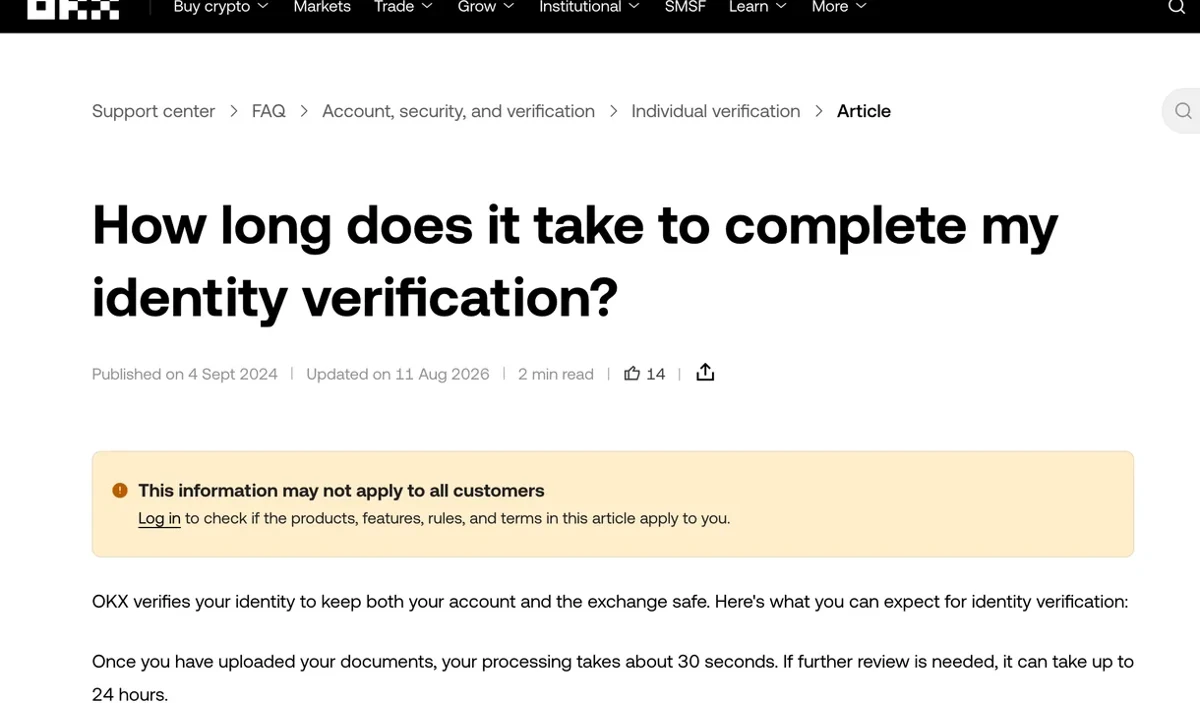
On timing, the help centre states that processing takes about 30 seconds once documents are uploaded, that it can take up to 24 hours where further review is needed, and that you should contact support if nothing has resolved within 24 hours (checked 2026-09). High demand can make it take longer. These are not guaranteed times; follow the actual review feedback.
As for rejections, working backwards from what the form demands, these are the things that go wrong:
- Glare on the ID photo, a corner cropped out of frame, or the shot simply out of focus — the system cannot read all the fields.
- An expired document, or one very close to expiry at the time of submission.
- A name on the form that does not match the document exactly: a dropped middle name, a nickname, given and family names in the wrong order.
- A face scan taken in dim light or against a window, or with a cap, glasses or mask in the way.
- Proof of address where the name or address does not match the account details, or a document issued too long ago.
One habit that saves real time: enter everything exactly as it reads on the document the first time. Changing a verified name, document or country of residence afterwards means going through a separate update process — the help centre has an entry devoted to it — and that is considerably more work than getting it right at the start.
Lock the account down on day one
This is the section worth the most time. Do the security configuration on the day the account opens, before any money is in it. That is when it costs the least, and the people doing it after an incident are usually doing it too late.
OKX publishes its own guide to hardening app security, and the list below follows it. We have added a column for what each setting actually protects against, because the names alone make it hard to judge priority.
| Setting | What it actually stops |
|---|---|
| Two-factor authentication with an authenticator app | Adds a separate verification step; does not prevent every phishing or session-hijacking attack |
| A strong password used only here | Credential leaks from other sites do not carry over |
| Passkey | Uses credentials bound to the service origin, unlocked by device biometrics or a PIN |
| Withdrawal address whitelist | Restricts destinations subject to activation, address-change rules and delays |
| Device list | Makes an unfamiliar session visible so you can remove it and change the password |
| API keys | If you do not use the API you should have none; compromised accounts quietly get one added |
| Linked third-party logins | Confirms the Google, Apple or Telegram accounts attached are yours |
Withdrawal whitelists can restrict destinations, but their effect depends on activation, address-change rules, delays and the platform configuration. They are not the only control that matters after compromise and do not guarantee that assets cannot leave. Check authenticators, passkeys, sessions and API permissions together.
The help centre also documents extras like large-withdrawal protection, an emergency contact, offline mode and a security assistant. Skimming those on day one is easier than learning them during an incident.
Everything above secures the account. Most people who lose money were taken by a page they opened themselves — a fake support agent, a spoofed email, a bogus app-update prompt. OKX's help centre has entries on verifying that an email genuinely came from OKX and on identifying official accounts, and both are worth working through once. Our full breakdown is in the phishing-defence note. The general rule: anyone asking for your seed phrase, private key or a verification code, or telling you to sign a "verification transaction", is running a scam regardless of whose name is on the message.
Connecting your wallet — a different code lives here
The OKX app contains two fundamentally different things:
- The exchange account — custodial, keys held by the platform, requires verification, moves fiat. Referral code
OK18866. - OKX Web3 Wallet — self-custody, seed phrase held by you, no verification, talks to chains. Referral code
166888.
These are separate referral programmes. Error messages, attribution, eligibility and correction options depend on current forms and terms. No error does not prove successful binding. Identify the product by its name and settings, not just by whether a screen asks for identity verification.
Then the part that matters more: the Web3 Wallet is self-custody, and living inside an exchange app does not change that. The seed phrase it gives you at creation exists only with you. Lose it and support cannot help — the exact opposite of the exchange account's recovery process, and a lot of people assume otherwise. Back it up to the standard set out in the self-custody primer, not to the standard of a screenshot.
You are also not obliged to use it. MetaMask, Rabby and Phantom all connect the same way, because the connection is nothing more than an address and a network — no account-level linking between the exchange and the wallet exists at all. The differences between them are broken down in the multi-chain wallet comparison. Both codes appear again on the card at the bottom of this page, where you can tap to copy either.
The first transfer out
Account open, verified, hardened. Now the two sides get connected for real:
- Deposit, wait for the fiat to land, and convert it into the token you want — for most people USDC or USDT.
- Open the withdrawal page and choose the network first. That choice decides whether this works, not the amount.
- Paste your wallet's receive address and compare the complete address with the trusted receiving interface against the wallet.
- Send only the platform minimum, submit, and wait until you can see it in the wallet.
- Once confirmed, send the real amount using the same address and the same network.
Steps 2 and 3 are where beginners lose funds, which is why they have their own piece: withdrawing from an exchange to a wallet explains why the same token on different networks does not interconnect and what is recoverable when the wrong chain is picked. Withdrawal fees and minimums vary by token and network, so no figures here — read the withdrawal page at the moment you use it.
One thing specific to fresh accounts: they trip risk controls more readily. A large withdrawal immediately after a password change, a newly added withdrawal address, or a login from an unfamiliar location commonly results in a slower review or a temporary limit. That is the security system working, not a fault. Doing the security setup and the sensitive changes all on day one means withdrawals run smoothly afterwards.
What this account is not for
At this point, drawing a few lines is more useful than restating the process:
- Not long-term storage. It is a gateway; money passes through. The row in the section 2 table about your balance being affected if the platform is in trouble is the one to remember.
- Not for leverage or derivatives you have not studied. Those products can cost you everything you put in and have nothing to do with what this note covers. Do not wander into them just because the buttons happen to be in the same app.
- Never hand over your password, seed phrase or verification codes — not to a support agent, not to someone offering to unfreeze your account. No legitimate process requires you to read those out.
- Not worth opening several accounts to collect more discounts. Platforms have their own rules about multiple accounts, and the consequences land on you, not on whoever referred you.
- Not a source of truth on whether your country is supported. Regulation keeps moving; check current platform terms, product eligibility and applicable local requirements, rather than relying only on whether the form proceeds.
None of this is technically demanding. The parts that repay attention are the seven security settings and the test transfer. Get those solid and the rest is just familiarity.
FAQ · five questions that come up
Do I need an exchange account at all if I only want self-custody?
No. You may already hold assets, receive them as payment or use another available entry route. An exchange is one option, not a technical prerequisite for self-custody.
Why does OKX have two different referral codes, and what happens if I enter the wrong one?
The exchange code OK18866 and Web3 wallet code 166888 belong to different plans. Current forms and terms determine errors, attribution, corrections and benefits. No error message does not prove that a code was applied.
How long does OKX identity verification take, and why do submissions get rejected?
The current help page describes roughly 30 seconds after upload, up to 24 hours for further review, and possible longer waits during high demand. Contact support after 24 hours without a result. Check document clarity, validity and matching details; follow the actual review response rather than treating the estimate as a guarantee.
Which security settings should I turn on the day I open the account?
Review a unique password, 2FA/authenticator, passkeys, devices, API permissions, linked logins and withdrawal whitelists. Whitelist protection depends on configuration and complements other controls. There is no fixed completion time.
How much should I move in my first withdrawal to my own wallet?
Choose an affordable test amount satisfying the current minimum and fee deductions. Verify the complete address, network, asset version and memo, then confirm actual receipt. Recheck every later withdrawal and its limits.
Sources used
- OKX Help Centre · individual verification section · okx.com/help/section/faq-verification · entry point for accepted documents, proof of address, facial recognition and review time
- OKX Help Centre · how long verification takes · okx.com/help/how-long-does-it-take… · source of the roughly 30 seconds / up to 24 hours figures (checked 2026-09)
- OKX Help Centre · enhancing app security · okx.com/help/how-can-i-enhance-my-okx-app-security · 2FA, authenticator, withdrawal address whitelist, passkeys, device and API review
- OKX Help Centre · account and wallet safeguard measures · okx.com/help/section/faq-account-and-wallet-safeguard-measures · verifying official emails and accounts, phishing
- This site · disclaimer and affiliate disclosure · how the referral links and codes work