A Zero Balance After Importing a Seed Phrase May Just Mean the New Wallet Derived Another Address
Copy your original receiving address and search for it on a block explorer. Looking up an address needs only the address itself: no seed phrase, no wallet connection. If the explorer still shows a balance at that address, your coins are still on-chain. Next, compare the address the new wallet shows with the original, character by character. If they differ, the new wallet has derived another address from the same seed phrase, and the cause may be the derivation path, the Bitcoin address type, how many accounts were restored automatically, or a passphrase set on the original wallet. If they match, the derivation is fine, and the thing to check is whether the new wallet has the chain your coins are on selected.
If you can't remember the original address and the old wallet app still opens, look at its receive page. If it won't open, go back through the records of transfers you sent to that address, such as the receiving address you entered in an exchange's withdrawal history. If the balance there is already 0 and the history shows an outgoing transfer you never made, the problem has nothing to do with switching wallets: follow the steps for a drained wallet to check approvals and keep evidence.
This article explains how a seed phrase derives addresses and how to set a new wallet back to the original derivation, and nothing here is investment advice. See the disclaimer.
Why one seed phrase gives different addresses in two wallets
A seed phrase doesn't point straight at one address. The wallet first turns it into a seed, then works down a derivation path one level at a time; take a different number at any level and you land on a different address. BIP-44 defines this path as five levels:
m / purpose' / coin_type' / account' / change / address_index
purpose is the purpose number, fixed at 44' under BIP-44. coin_type gives each coin its own subtree, and Bitcoin uses 0. account is the account index, counting up from 0 in order. change is 0 for addresses that receive from others and 1 for change addresses. address_index is the position of the address on that chain, also counting from 0. The first receiving address of Bitcoin's first account therefore has the path m/44'/0'/0'/0/0. Change the number at any of the five levels and you get a different address, even if every word of the seed phrase is right.
Bitcoin adds one more variable: the address type. BIP-84 and BIP-86 keep the same five-level structure but replace the purpose number with 84' and 86', and the address type and its prefix change along with it.
| Address starts with | BIP | Path to the first receiving address of account 0 |
|---|---|---|
| bc1q | BIP-84, P2WPKH address | m/84'/0'/0'/0/0 |
| bc1p | BIP-86, single-key P2TR (Taproot) | m/86'/0'/0'/0/0 |
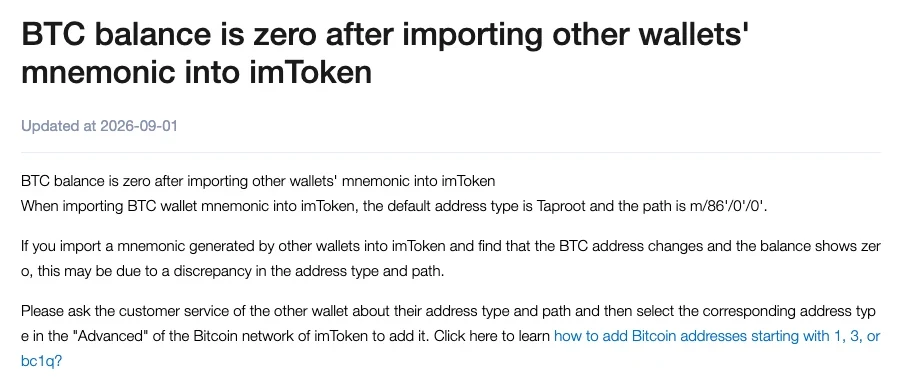
imToken's Help Center states that when you import a BTC wallet mnemonic, "the default address type is Taproot and the path is m/86'/0'/0'", and that an address that changes after import with a balance of zero may come from a mismatch in address type and path. Taken down to the first receiving address of account 0, the full path is m/86'/0'/0'/0/0. If the addresses in your original wallet start with bc1q, 1 or 3 but the imported one starts with bc1p, a type mismatch is the likely reason for this zero balance. The fix is to ask the original wallet's support which address type and path it uses, then add the matching address type under "Advanced" for the Bitcoin network in imToken.
Only one account came back after import: how do you add the rest?
The accounts created from one seed phrase are derived one after another by index. How far an import goes down those indexes, and where it stops, depends on the wallet. MetaMask's rule is to check accounts in ascending order and add those with a non-zero ETH balance on Ethereum Mainnet, and "when it hits an account with 0 ETH, the process stops."
Under that rule, if an early account holds no ETH on Ethereum Mainnet, the check stops right there, and the accounts after it won't appear automatically even if they hold coins on other chains. To get them back, add accounts manually in the wallet, one at a time, and compare each new address with the original.
Accounts you imported separately with a private key fall outside what this seed phrase derives: "Accounts imported via private keys or from other SRPs will need to be manually re-added." Import that private key or other seed phrase again. If none of the addresses you're looking for show up, the possibilities the MetaMask Help Center lists are a wrong seed phrase, or an external JSON file or private key you still need to reimport. In that case, check each word's spelling and order.
Wallets that follow BIP-44 for account discovery rely on transaction history instead: if no transactions turn up on the chain an account uses for receiving, discovery stops and the next account isn't checked. On a single chain, once the software hits 20 unused addresses in a row, it assumes no used address comes after them and stops scanning.
A missing passphrase opens a different, valid wallet
BIP-39 lets users protect a seed phrase with an extra passphrase; when no passphrase is set, the standard uses an empty string in its place.
The trouble comes from how the standard is designed. Every passphrase generates a valid seed and a complete, working wallet, and only the original passphrase opens the one where you kept your coins. Leave it out on import and you get the wallet for the empty string; get one character wrong and you get yet another. The addresses in these wallets look perfectly normal. They just don't belong to the original wallet.
Think back to whether you set a passphrase like this when you created or backed up the original wallet. If you did, and the new wallet's import screen has a field for it, enter the passphrase exactly as you set it, then compare the derived address with the original one you found on the explorer. If you never set one, the passphrase isn't the problem; go back to the path and the accounts.
Choosing the address path by hand when you import a seed phrase
Find the address type and path the original wallet uses in its official help center, or ask through the official support entry inside the original wallet's app. You are only asking about two things, the address type and the path, and you never need to reveal your seed phrase to get them.
With the path in hand, this is how the import goes in TokenPocket:
- On the seed phrase import screen, tap [Advanced Mode].
- In Advanced Mode, set the address path to the one the original wallet uses.
- After importing, compare the address the new wallet shows with the original address you found on the explorer, character by character.
For other wallets, check each one's own help center for where to set the import path or address type.
From checking the balance through to importing, your seed phrase belongs in exactly one place: the import screen of a wallet app you installed from an official source. Web pages offering a "recovery tool" or "balance lookup", and people in your DMs who say they can get your assets back, should never get it. If someone asks for your recovery phrase so they can sync, repair or unfreeze something, treat it as fake support asking for recovery credentials and stop all contact.
If the original wallet still opens, don't uninstall or reset it yet. Decide whether to keep the old app only after the new wallet shows an address identical to the one on the explorer, with a balance that matches too.
Before and after the address matches
Can a forgotten passphrase be recovered?
Only by remembering it yourself. Under BIP-39 any passphrase produces a valid wallet, and only the original one matches the wallet where you kept your coins, so for every candidate you try, compare the derived address with the original one character by character. Don't hand your seed phrase or candidate passphrases to any website or “recovery service” to try for you.
The address matches but the balance is still 0. What now?
If the address matches character for character, the derivation is fine. Go back to the block explorer to see which chain the coins are on and which token they are, then check whether the new wallet currently has that network selected. If the explorer shows a balance and the wallet still shows nothing after you switch to that chain, take the address and the chain name to the wallet's official support. You don't need to give them your seed phrase.
Does importing the same seed phrase into two wallets affect either of them?
You can use both wallets at the same time. When the paths match, the two apps derive the same set of addresses, so whichever app you send from, the chain records it under the same address, and the balance in the other app changes once it refreshes. The cost is that the seed phrase is now stored in one more place, and a leak from either one puts the assets in both at risk.
Sources cited
- BIP-39: Mnemonic code for generating deterministic keys · github.com/bitcoin/bips/blob/master/bip-0039.mediawiki
- BIP-44: Multi-Account Hierarchy for Deterministic Wallets · github.com/bitcoin/bips/blob/master/bip-0044.mediawiki
- BIP-84: Derivation scheme for P2WPKH based accounts · github.com/bitcoin/bips/blob/master/bip-0084.mediawiki
- BIP-86: Key Derivation for Single Key P2TR Outputs · github.com/bitcoin/bips/blob/master/bip-0086.mediawiki
- MetaMask Help Center, How to restore your wallet using your Secret Recovery Phrase · support.metamask.io/configure/wallet/how-to-restore-your-metamask-wallet-from-secret-recovery-phrase
- TokenPocket Help Center, What’s the path · help.tokenpocket.pro/en/wallet-faq-en/btc-wallet/path
- TokenPocket Help Center, How to Create and Import Sub wallets in TokenPocket? (path import through Advanced Mode) · help.tokenpocket.pro/en/wallet-operation/how-to-create-a-wallet/batch
- imToken Help Center, BTC balance is zero after importing other wallets' mnemonic into imToken · token.im/hc/en-us/articles/7517484502681