Speed Up and Cancel Both Replace a Pending Transaction, and the Oldest Nonce Has to Be Cleared First
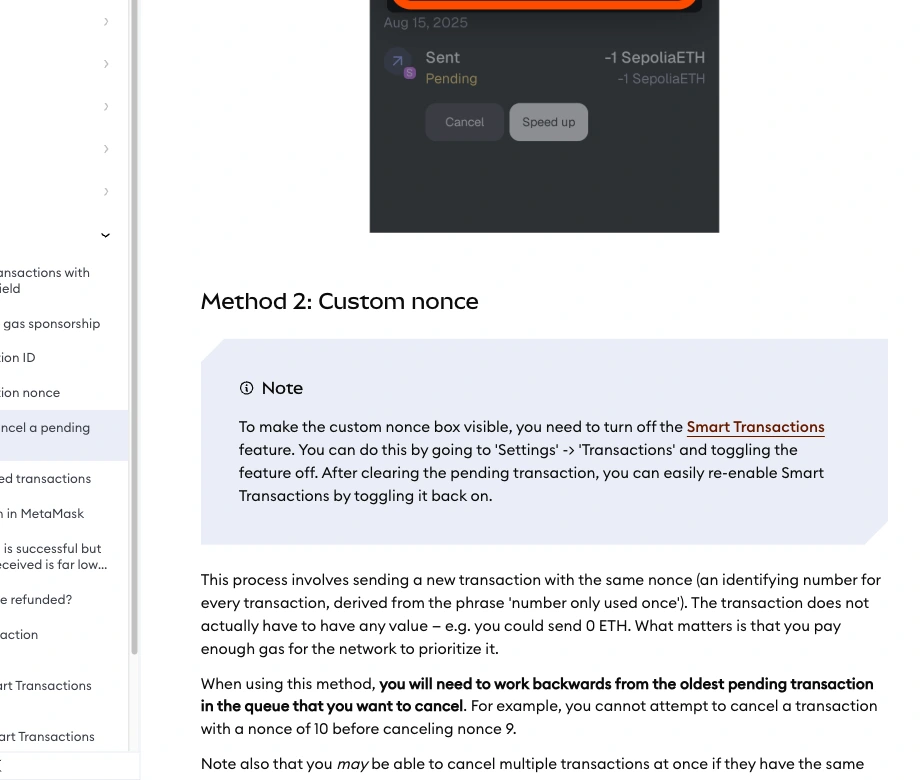
A transaction you sent is still marked Pending in the wallet, with Cancel and Speed up side by side underneath it. Both buttons send a replacement on the same nonce, and when more than one transaction is stuck, the one with the lowest nonce has to be dealt with before anything behind it can move.
⚠ Educational content only — not financial, investment or security advice. On-chain transactions are irreversible, and replacing a pending transaction is not guaranteed to work. Full disclosure → disclaimer.
- Two different states both show up as Pending
- Speed up resends the same transaction at a higher fee
- Cancel is a race, run with a replacement on the same nonce
- The oldest transaction in the queue has to go first
- Custom nonce and the Smart Transactions toggle
- Cases where a pending transaction is better left alone
- FAQ
Two different states both show up as Pending
The same Pending label covers two quite different situations. In the first, the transaction has been broadcast and is sitting in the network's pool of pending transactions, waiting to be included in a block; if its fee is on the low side, that wait can be long. In the second, its turn has not come at all: an earlier transaction from the same account is still unresolved, this one is queued behind it, and no amount of gas will move it.
To tell them apart, paste the transaction hash into the block explorer for the chain it was sent on. A Pending entry there means the network knows about it. Nothing at all means it may never have been broadcast, you may be looking at the wrong chain, or nodes may already have dropped it from the pending pool. Read a Block Explorer: Eight Transaction Fields walks through which lines to read on that page.
A wallet keeps a record of what it submitted even after nodes have dropped the transaction from the pool, so a transaction still listed in the wallet may no longer be waiting on the network.
Speed up resends the same transaction at a higher fee
Speed up sends the transaction again. MetaMask's help page says the button "will let you re-submit the same transaction, but with a higher gas fee that should allow the transaction to be processed faster." The recipient, the amount and the call data stay as they were. Only the bid changes.
Note the "should": the page makes no guarantee. A higher bid only moves the transaction up the pending pool. What goes into the next block depends on what everyone else is bidding at that moment, and on a congested network a raised fee can still mean more waiting. If you send the replacement yourself with a custom nonce, MetaMask's help page asks for a max priority fee "at least 10% higher" and a max fee "at least 30% higher" than the transaction you're replacing.
Cancel is a race, run with a replacement on the same nonce
Cancel does not pull a transaction back from the network. The chain has no such operation. What it really does is send a new transaction with the same nonce and try to get it into a block ahead of the original; once the new one is included, the old one is void because its nonce has been used.
In the help page's words, "a cancellation can only be attempted if the transaction is still pending on the network. Transactions that have already been confirmed cannot be reversed." Read together, those two sentences describe a race. If the original is included at the moment you press the button, the replacement arrives a step late and the original goes through as normal.
The replacement can be empty. The page puts it this way: "The transaction does not actually have to have any value — e.g. you could send 0 ETH. What matters is that you pay enough gas for the network to prioritize it." So what canceling costs is the fee paid on the replacement to compete for a place in a block; the original, once displaced, never lands on-chain and is not charged.
The help page describes two ways to cancel: selecting Cancel under the transaction inside the app, or setting the nonce yourself. The first is less work. The second only becomes necessary when several transactions are stuck in the queue, or when you need to choose exactly which one to replace.
Where the two buttons sit depends on the extension version. According to the help page, on MetaMask Extension 13.30 or later, transactions on Ethereum, Linea, BNB Smart Chain, Arbitrum, Base and Polygon no longer open a full-screen page after you submit; a "Transaction submitted" toast appears in the sidebar instead. Click the toast to open the transaction detail view, where Speed up and Cancel are available while the transaction is still pending.
The oldest transaction in the queue has to go first
A nonce is the sequence number on each transaction, which the help page glosses as "an identifying number for every transaction, derived from the phrase 'number only used once'". Transactions from one account execute in nonce order and the chain does not skip ahead: until nonce 9 is settled, nonce 10 stays stuck behind it.
That is the second kind of pending described earlier. Send three in a row, let the first stall on a low fee, and the other two look pending as well while in fact they are not even in the running. Speeding up the third does nothing, because the blockage is the first.
The help page is blunt about it: "you will need to work backwards from the oldest pending transaction in the queue that you want to cancel. For example, you cannot attempt to cancel a transaction with a nonce of 10 before canceling nonce 9." In practice, find the transaction with the lowest nonce, speed it up or cancel it, then see whether the ones behind it start moving without further help.
One detail that is easy to get backwards: a failed transaction uses up its nonce too. A transaction that is included and then reverts has taken that number, and the next transaction does not get to reuse it.
Custom nonce and the Smart Transactions toggle
When several transactions are stuck, or you need to choose exactly which one to replace, you have to enter the nonce yourself. The nonce field is hidden by default, and the setting that reveals it is in a different place in the browser extension and in the mobile app.
In the extension, MetaMask's help page says to toggle "Show advanced details" in the upper right corner of the transaction review window; you need it on to send a replacement with the same nonce. If Smart Transactions is enabled and the transaction is on Ethereum Mainnet or BNB Smart Chain, turn Smart Transactions off under Settings → Transactions before customizing the nonce, and turn it back on once you are done.
In the mobile app, go to Settings > Advanced and turn on "Customize transaction nonce".
Once that is set, start a new transaction, set the nonce to the number you want to replace, and raise the gas fee. As noted above, this can be an empty transfer of 0 to your own address. It is still a race once sent, so confirm the outcome on the block explorer instead of going by the wallet's status message.
All the menu paths and button names above are MetaMask's. Other wallets use different names and do it differently. With another wallet, go by its own official help page and do not carry these menu paths over.
Cases where a pending transaction is better left alone
A transaction that is already confirmed. The help page is plain that a confirmed transaction cannot be reversed. Sending another transaction with the same nonce at that point displaces nothing; it is simply rejected because the nonce has been used. Getting the funds back is a matter for the recipient or the platform. The chain has no undo button.
A transaction your account did not send. Only the account holding the private key can send transactions on its own nonce. A transfer someone else is sending you, a call a contract executes on your behalf, an exchange withdrawal on its way: you can neither speed these up nor cancel them from your side. What you can do is contact whoever sent it.
Two-stage operations such as a bridge. The transaction on the source chain is only the first half; the second half happens separately on the destination chain. Canceling the source transaction before it confirms generally means the whole thing never started. Once it confirms on the source chain, the rest is in the hands of the bridge's own process and there is nothing left to cancel. For how to wait on and verify this kind of transfer, see Withdraw to Your Wallet: Network and Address Checks.
Using cancel as if it revoked a permission. Canceling an approve transaction that has not been included yet and revoking an allowance that is already in effect are two different things. The first just stops that transaction from happening. The second takes a separate transaction to change the allowance recorded in the token contract. The difference is laid out in Token Approvals and Revoke: Allowance vs Permit.
And sometimes there is nothing to do: the fee was reasonable, the network is busy for the moment, and waiting is enough. For any one nonce, only the transaction that ends up on-chain is charged gas, so speeding up raises what this one pays and canceling means paying for the replacement instead. The higher you bid, the more you pay, and paying extra just to wait less is not always worth it. The settings on an everyday transaction get their own explanation in On-Chain Swaps: Approval, Quotes and Receipts.
FAQ
Do I pay another fee when I speed up or cancel?
The replacement is a new on-chain transaction and pays according to its own gas bid. Only one transaction per nonce is ever included, and the one that never lands incurs no on-chain fee. Go by the receipt for what was actually charged, not the estimate the wallet showed before you submitted.
Will a pending transaction expire if I just leave it?
An EVM transaction has no protocol-level expiry and does not lapse at a set time. One that goes unincluded for long enough may be dropped from nodes' mempools, in which case it neither lands on-chain nor uses up its nonce, and the wallet's display may not update to match. The record on the block explorer is what settles its final state.
It is still not included after speeding up. Can I speed it up again?
Yes. Speeding up is just sending again on the same nonce, so the higher bid carries on competing and repeating it causes no conflict. Each attempt is another transaction to confirm in the wallet, and only the one that gets included for that nonce pays an on-chain fee. If several attempts go nowhere, check on the explorer that the transaction is still in the pending pool, then look for an older transaction ahead of it in the queue.
Can this stuck transaction hold up the same address on other chains?
No. Nonces are counted per account on each chain separately. A transaction stuck on Ethereum mainnet does not stop the same address from sending on other EVM networks; only later transactions from the same account on the same chain queue behind it.
Sources cited
- MetaMask Help Center, How to speed up or cancel a pending transaction, September 2026 · support.metamask.io/manage-crypto/transactions/how-to-speed-up-or-cancel-a-pending-transaction
Button positions, menu names and the methods on offer change with wallet version and account type; for other wallets, go by their own official help pages.